Change of proxy IP address (End Office Tandem)

My far end tandem office wants to change their IP, and I need to modify my SBC config to match.

Can you describe the steps I need to take to change this?
Cust IP is my SBC, IQ IP is far end. I am assuming I do not need to do anything with the new RTP port range as this info is negotiated? Would that be true?

Thanks!
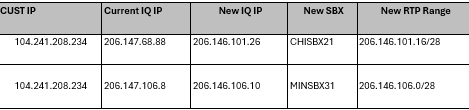
Hello,

You’re correct about RTP — it’s negotiated via SDP in the INVITE/200 OK exchange. The far end’s new RTP range doesn’t need to be configured on the ProSBC.

Here are the ProSBC changes needed for each far-end IP change:

1. Update NAP proxy address — Configuration → NAPs → select the NAP for that tandem → change proxy_address from the old IQ IP to the new one.

2. Update ACL (if set) — If the NAP uses an ACL (nap_sip_acls) to filter inbound signaling by source IP, add the new IP and remove the old one. If the NAP uses sip_use_proxy: true (trunk mode) with no ACL, this step is optional since the proxy filter covers it — but adding the new IP to the ACL as a belt-and-suspenders measure won’t hurt.

3. (Optional) Update transport server — Only needed if your own ProSBC IP is changing, which it isn’t here.

4. Activate config — Apply the changes.

That’s it. The RTP port range on your ProSBC (port_ranges) stays the same — your SBC will tell the far end what ports to send RTP to via SDP, and the far end will tell your SBC where to send RTP via their SDP. No config needed for the far end’s new range.